Danke,er zeigt mir keine Fehlermeldung mehr an.Ich kann aber erst Morgen ausprobieren ob er auch bei 12V nicht ausschaltet.Ich melde mich morgen noch mal.
Gruss Andreas 

Danke,er zeigt mir keine Fehlermeldung mehr an.Ich kann aber erst Morgen ausprobieren ob er auch bei 12V nicht ausschaltet.Ich melde mich morgen noch mal.
Gruss Andreas
Hallo bodok!
Danke nochmal es läuft jetzt auch im Auto bei Stromanschluss.Eine frage hätte ich jetzt aber noch, wie bekomme ich den script auf den desktop?Ich habe ihn nämlich auf die Speicherkarte getan.Danke
Gruss Andreas
Hallo Andreas,
Du must eine Verknüpfung unter \Windows\Startmenü\Programme von dem Script erzeugen,
dann wird es Dir unter Programme angezeigt.
Du kannst es dann von da starten oder auf eine HW-Taste legen (ist einfacher).
Am besten geht das mit dem Total Commander, DownLoad HIER .
Wenn Du es nicht alleine schaffst melde Dich, ich helfe Dir dann weiter.
Gruss Bodo
Hat geklappt,danke nochmal.
Gruss Andreas
ZitatAlles anzeigenOriginal von bodok
Hallo Andreas,
Du must eine Verknüpfung unter \Windows\Startmenü\Programme von dem Script erzeugen,
dann wird es Dir unter Programme angezeigt.
Du kannst es dann von da starten oder auf eine HW-Taste legen (ist einfacher).
Am besten geht das mit dem Total Commander, DownLoad HIER .
Wenn Du es nicht alleine schaffst melde Dich, ich helfe Dir dann weiter.
Gruss Bodo
hi , i have the same problem with my medion 40600. but since i don' t speak german , is someone willing to translate this in english ??
i don't know what to do with this file. do i need any additional software ?
tia
ZitatOriginal von LinQ
hi , i have the same problem with my medion 40600. but since i don' t speak german , is someone willing to translate this in english ??
i don't know what to do with this file. do i need any additional software ?..
Hi
Yes you do. The program you need is called MortScript, you can download it from here:
http://www.sto-helit.de/modules/edito/content.php?id=38
You will also find a help page (manual) on that site. MortScript is a program to run small scripts written in a simple batch language. The zip file, which bodo posted, contains such a script to manage some things after iGO starts and when it's running.
At last bodo mentioned, that after you have installed MortScript and put the script file in a directory on your PPC, you have to make a shortcut to that script file in the \Windows\startmenu\programs directory (is that correct for the English version?) and put the shortcut on your PPC's desktop or make a link to a function key of your PPC to run the script from there. You may use Total Commander to make that shortcut easily. You can download Total Commander from this site -> here (the ppc version).
In bodo's script, there's a line at the beginning:
Run "\Programme\iGO 2006\iGO.exe"
I think you will have to change the path to iGO, because you probably have got the English Windows mobile version on your ppc?
Every time you start the script now, it will first start iGO and as long as iGO runs, the script sets a value in your PPC's registry every 15 seconds if necessary to manage the backlight in the wright way. When you exit iGO, the script will also stop. Thats it.
P.S.
Welcome to our forum 
ZitatWelcome to our forum
thx m8 and thx for translation.
i forgot to mention i use miomap3.2 so i changed the path and filenames but i doesnt't seem to work.miomap starts but i get an error after 60 sec.
any idea what i do wrong??
this is the script :
# Starte Navigator
Run "\Program FILES\MioMap\miomap.exe"
WaitForActive "miomap",60
#alle 15 Sekunde prüfen ob iGO noch läuft
while wndExists "miomap"
sleep 15000
#Hintergrundbeleuchtung bei Netzbetrieb ständig ein, prüfen und aktivieren
if not regKeyEqualsDWord HKCU,ControlPanel\Backlight,ACTimeout,0
RegWriteDWord HKCU,ControlPanel\Backlight,ACTimeout,0
endif
endwhile
ZitatAlles anzeigenOriginal von LinQ
thx m8 and thx for translation.
i forgot to mention i use miomap3.2 so i changed the path and filenames but i doesnt't seem to work.miomap starts but i get an error after 60 sec.
any idea what i do wrong??
this is the script :
# Starte Navigator
Run "\Program FILES\MioMap\miomap.exe"
WaitForActive "miomap",60
#alle 15 Sekunde prüfen ob iGO noch läuft
while wndExists "miomap"
sleep 15000
#Hintergrundbeleuchtung bei Netzbetrieb ständig ein, prüfen und aktivieren
if not regKeyEqualsDWord HKCU,ControlPanel\Backlight,ACTimeout,0
RegWriteDWord HKCU,ControlPanel\Backlight,ACTimeout,0
endif
endwhile
I think, MortScript doesn't recognize whether miomap is running and will terminate. Sorry, I haven't any idea, because I don't use MortScript at all. Perhaps at runtime, the name "miomap" is wrong? What exact error message do you get ?
@Bodo
Bei LinQ kommt also nach 60 sec eine Fehlermeldung. Könnte es sein, dass MortScript miomap nicht als laufenden Prozess findet ? Ist der Name "miomap" zur Laufzeit der richtige oder reichen die 60 Sekunden Wartezeit nicht ?
window miomap could not be found
line : waitforactive"miomap",60
so i guess the name miomap is wrong but have no idea what it should be
ZitatOriginal von LinQ
window miomap could not be found
line : waitforactive"miomap",60
so i guess the name miomap is wrong but have no idea what it should be
Yes, I think, that's the problem.
@all miomap users and experts.
What's the name of the miomap window at runtime that MortScript can use?
Wie lautet der Name des miomap Window zur Laufzeit? Diesen Namen soll MortScript abfragen können.
@LinQ
Perhaps you should post your question for the miomap runtime window name again in the miomap forum here:
@fwsurfer
Friedrich, Danke für die Beantwortung an LinkQ, bin gerade erst wieder zu Hause angekommen.
@LinQ
Here is the Script (mortscript) for MioMap:
--------
Run "Programme\MioMap\MioMap.exe"
WaitForActive "MioMap",60
#alle 20 Sekunden prüfen ob Miomap noch läuft
while wndExists "MioMap"
sleep 20000
#Hintergrundbeleuchtung bei Netzbetrieb ständig ein, prüfen und aktivieren
if not regKeyEqualsDWord HKCU,ControlPanel\Backlight,ACTimeout,0
RegWriteDWord HKCU,ControlPanel\Backlight,ACTimeout,0
endif
endwhile
-----
Path possible adapt. Upper/lower case letters heed.
YES !! it seems to work. i'll test it later in the car , but i presume it will be ok
thx for all the help guys ![:]](https://forum.pocketnavigation.de/cms/images/smilies/pleased.gif "Zufrieden Grinsen...")
Das muss doch auch alles ohne Script gehen, dafür ist doch schließlich die pocket_pc.ini da.
M. E. alles eine Frage der korrekten
blight_setmode#=0/1
blight_useevent_# = 0/1
blight_key_* ="..."
und natürlich der richtigen Section, wenn man nicht die [Default] nutzen will.
Bei mir müsste es [MEDION, MDPPC200] sein, wie
[debug]
;- show_device_type Zeigt baim Start den erkannten PDA-Typ an
;show_device_type=1
in der sys.txt zeigt.
Hat wirklich noch keiner eine Ohne-Script-Lösung?
Du solltest im PDAmill Forum danach fragen, dort sind die Developer von iGO unterwegs. Das mit den mortscripts sind alles nur Krücken, eigentlich sollte das Program das regeln, bzw. die Finger davon lassen.
Grüsse
PS: Vlt. klappts ja in der 133.beta-Version? 
ZitatAlles anzeigenOriginal von Rainersen
Das muss doch auch alles ohne Script gehen, dafür ist doch schließlich die pocket_pc.ini da.
M. E. alles eine Frage der korrekten
blight_setmode#=0/1
blight_useevent_# = 0/1
blight_key_* ="..."
und natürlich der richtigen Section, wenn man nicht die [Default] nutzen will.
Bei mir müsste es [MEDION, MDPPC200] sein, wie
[debug]
;- show_device_type Zeigt baim Start den erkannten PDA-Typ an
;show_device_type=1
in der sys.txt zeigt.
Hat wirklich noch keiner eine Ohne-Script-Lösung?
Installiere mal die aktuelle 2006SE beta v. 19.01.2007. Alte Version vorher sichern !!
Ich nutze bei meinem Bluemedia 255 (=Yak 300 GPS) aber weiterhin die [Default] Section und habe dort die blight_... Zeilen auskommentiert.
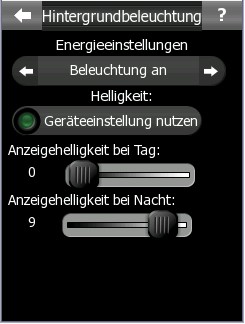
EDIT: Nachtrag, ich bekomme dann diese Einstellmöglichkeiten in iGO
[Blockierte Grafik: http://666kb.com/i/al4ca2vx2yasnzi2p.jpg]
Button Texte können abweichen, da ich eine andere german.zip Datei verwende.